
Kantech access-control management for single-site, corporate and multi-site applications with workstation, web and mobile workflows.
Products and selection guidance
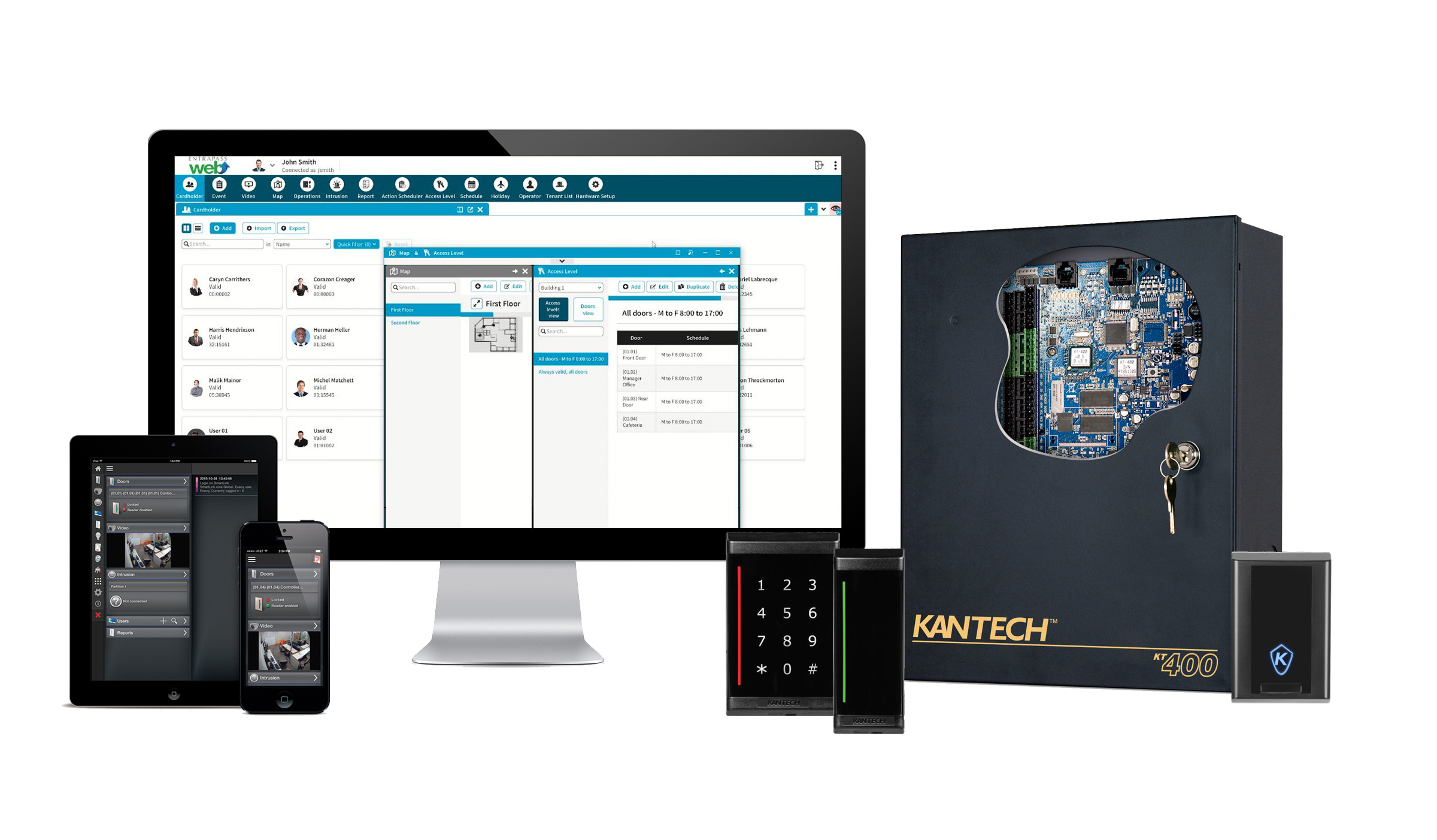
EntraPass editions and current web/mobile options differ in controller capacity, workstations, gateways, integrations and enterprise functions. Document the installed EntraPass version and SQL/server environment before upgrading; confirm edition licenses, controller communication paths, backups and operator permissions.
- EntraPass edition and server/workstation architecture
- Web and mobile operator functions
- Video, intrusion, elevator and directory integrations
- Database backup, version upgrade and controller firmware plan
- Door, lock, free-egress, accessibility and fire-alarm requirements
- Network, power, standby battery and outage behavior
- Current licenses, subscriptions, firmware and integrations
- Administrator training, backup, documentation and maintenance
Site-specific design
Boston High Tech inventories existing equipment and validates current manufacturer compatibility before specifying reuse, migration or replacement. Qualifications may be confirmed privately when needed; license numbers, certificate copies and named certificate-holder details are not published.
Request a manufacturer-specific consultation
Projects are supported from our Charlotte headquarters and local client offices serving Massachusetts, New York and New Jersey.
Official manufacturer references
How to compare and specify this product family
For Kantech EntraPass Software, Web and Mobile Management, the right model and architecture depend on the site, existing infrastructure and operating policy. A proposal should clearly document the following access-control system decisions before equipment is ordered:
- Number and type of controlled openings
- Controller, reader, lock and credential compatibility
- Cloud or on-premise administration and ownership
- Offline behavior, backup power and emergency operation
- Directory, HR, video, visitor and elevator integrations
- Licensing, cybersecurity, training and lifecycle support
Installation, testing and handoff
A site survey records each opening, door hardware, cable path, power, network, credential policy and integration requirement. The design then maps readers, controllers, locks, inputs, outputs and administrator roles to the operational workflow. Commissioning includes door-by-door functional tests, failure-mode and backup-power checks, permission and schedule tests, event verification, administrator training and as-built documentation. Product availability, subscriptions and supported integrations are confirmed for the current project before procurement.
Frequently asked questions
Questions that come up when specifying or upgrading EntraPass across workstations, web and mobile operators.
How do we pick an EntraPass edition?
By the five things the editions differ on: controller capacity, workstations, gateways, integrations and enterprise functions. Count the controllers the finished project will carry, count the operator seats that have to work at once, and list the integrations by name. The edition falls out of those numbers, and the license follows the edition rather than the reverse.
What has to be documented before an upgrade can be quoted?
The installed EntraPass version and the SQL/server environment it runs on, first of all, because those two decide whether the work is a step or a migration. Edition licenses, controller communication paths, backups and operator permissions are recorded next, so nothing that works today quietly disappears when the software moves.
Can operators run doors from a browser or a phone?
EntraPass is offered with workstation, web and mobile workflows, so the question is which tasks each operator role performs in each. Web and mobile operator functions sit on the list of items the design documents, alongside operator permissions and controller communication paths. Name the roles that work away from a workstation, then verify the installed version supports what those roles need.
Will EntraPass tie into our cameras, intrusion panel and elevator?
Video, intrusion, elevator and directory integrations sit on the list of decisions to settle before ordering, and editions differ in the integrations they carry, so the answer moves with the edition selected. Name the specific systems early, make and version included, because the edition choice follows from that list instead of preceding it.
How do the door controllers reach the EntraPass server?
Through the controller communication paths recorded for the site, which reach the server directly or by way of gateways depending on the architecture the edition supports. Document those paths per building during design, together with network, power and standby battery arrangements, so the electrical and network scopes cover every controller location instead of the obvious ones.
What does the backup and firmware plan cover after go-live?
The plan covers the EntraPass database, the version upgrade path and controller firmware together, because the database, the software version and the controllers have to stay compatible with one another. Test a restore rather than trusting that backups are running, and put the schedule into administrator training and documentation so the customer’s own staff can carry it out.
Kantech owner, administrator and buyer resources
Discuss Kantech installation, maintenance or service
Detailed guides are maintained by 360TechnologyGroup.com, the parent-company knowledge center.
Official Kantech software, firmware and support
Official manufacturer resources. We link out rather than host firmware.
Before updating: confirm model, hardware revision, current version, entitlement and rollback plan, and schedule monitored or life-safety-adjacent systems with the administrator.