
Operational and security extensions for staffed properties and unit-door access, designed to work with the broader ButterflyMX platform.
What this product family does
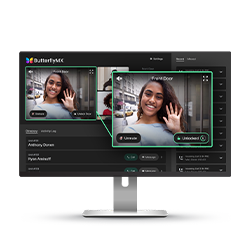
Front Desk Station supports staff visitor and access workflows. ButterflyMX also lists security-camera connectivity and integrations with numerous smart-lock models. Compatibility is product- and version-specific, so the exact lock, gateway, camera and property-management integration must be confirmed before it appears in the contract.
Products and decisions
| Product area | What it includes | Selection guidance |
|---|---|---|
| Front Desk Station | Staff-facing visitor and property access dashboard | Define roles, desks, failover, visitor identity checks and event retention |
| Security cameras | Camera context connected to access events and property security | Define supported devices, coverage, recording, privacy, retention and export needs |
| Smart locks | Unit or interior-door integrations across supported lock brands | Verify every lock model, firmware, gateway and door preparation |
| Property integrations | PMS and operational-system connections | Map the source of truth for residents, tenants, units and move-in/out dates |
Questions to answer before quoting
- Which desk operates the system and during what hours?
- Is video live only or recorded, and for how long?
- Which exact smart-lock models and firmware are installed?
- How are integration failures detected and corrected?
- Who owns administration, backups, updates and recurring services?
- What must continue working during network, internet or power failure?
- Which opening, egress, accessibility and life-safety requirements apply?
- What training, documentation and preventive maintenance are required?
Request a product-specific site survey
Boston High Tech serves projects from our Charlotte headquarters and local client offices serving Massachusetts, New York and New Jersey.
Official manufacturer references
Capabilities and product families were checked against the manufacturer links below.
How to compare and specify this product family
For ButterflyMX Front Desk, Cameras and Smart Lock Integrations, the right model and architecture depend on the site, existing infrastructure and operating policy. A proposal should clearly document the following video-surveillance system decisions before equipment is ordered:
- Scene purpose and required pixels on target
- Lens, mounting height, WDR, IR and low-light needs
- Analytics supported by the selected camera and VMS
- Bandwidth, PoE and network segmentation
- Retention, storage throughput and export workflow
- User roles, cybersecurity, health monitoring and support
Installation, testing and handoff
Design starts with the evidence or operational result required at each scene—not megapixels alone. We document fields of view, identification targets, lighting, camera placement, network load, recording profiles and retention assumptions. Commissioning covers focus, exposure, time synchronization, analytics calibration, user permissions, mobile or remote access, export testing and health alerts. Final documentation records device names, locations, addressing, retention settings and administrator procedures without publishing private credentials.
Frequently asked questions
Questions property managers ask about Front Desk Station, camera connectivity and smart-lock integrations before those items enter a ButterflyMX contract.
What does the Front Desk Station do for staff?
Front Desk Station is a staff-facing visitor and property access dashboard, so the people working the desk handle visitor and access workflows from one screen. Before the station is designed, define which staff roles operate it, what identity check a visitor goes through, what happens when another employee covers the desk, and how long the event record is kept.
How do we confirm the locks on our unit doors are supported?
By inventorying the installed locks before the contract, not after. ButterflyMX lists integrations with numerous smart-lock models, and compatibility is product- and version-specific, so verify every lock model, firmware, gateway and door preparation across the property. One stack of units running an older firmware revision is enough to break an assumption made from the model name alone.
Are the cameras live only, or is video recorded?
The property settles that before design rather than inheriting a default. ButterflyMX lists security-camera connectivity that puts camera context alongside access events; whether images are retained, for how long, and who may export them are separate choices with privacy consequences. State the retention period and the export process in the scope so the camera list is sized against those choices.
Where does the resident list come from once the system is live?
From whichever system is named the source of truth for residents, tenants, units and move-in/out dates, and that system is named before any property integration is built. If the PMS holds move-out dates, access records follow the PMS; if the desk keeps a separate list, departed residents linger in one system or the other. Put the owning system and the mismatch check in writing.
Do the unit doors need new hardware prep for these locks?
Some will. A retrofit lock that drops onto one unit door can miss on backset, door thickness or strike alignment in an older stack, so the walkthrough measures a sample of each door type instead of trusting the unit count. Unit or interior-door integrations across supported lock brands are then scheduled by door type, with exceptions listed by unit number.
What happens outside front desk hours?
The property defines that, and the definition shapes the design. Answer which desk operates the system and during what hours, then state what covers the remaining hours: who holds administrator rights overnight, where a visitor request goes, and whether the station is left signed in or locked. Administration, backups, updates and recurring services need a named owner in the same document.
ButterflyMX owner, administrator and buyer resources
Discuss ButterflyMX installation, maintenance or service
Detailed guides are maintained by 360TechnologyGroup.com, the parent-company knowledge center.
Official ButterflyMX software, firmware and support
Official manufacturer resources. We link out rather than host firmware.
Before updating: confirm model, hardware revision, current version, entitlement and rollback plan, and schedule monitored or life-safety-adjacent systems with the administrator.