
Long-range encrypted wireless devices, keypads, sirens and IP/cellular communication for DSC systems.
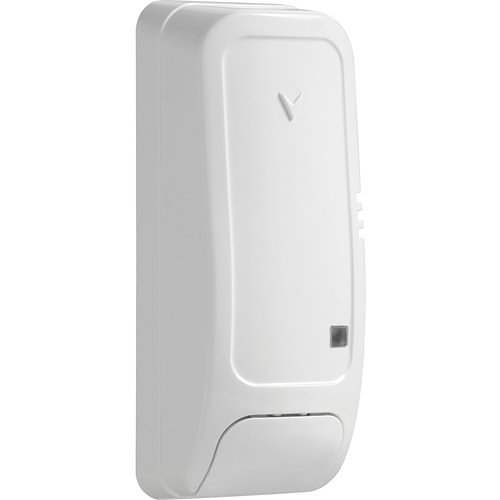
Product and design guidance
PowerG devices cover door/window, motion, glassbreak, smoke/heat and specialty sensors. Select detectors by environment and threat—not convenience. Plan RF surveys, repeaters, battery service, verification/cross-zoning and dual-path IP/cellular monitoring. Alarm.com or other services depend on compatible panel/communicator and account.
- PowerG door, motion, glassbreak and life-safety sensors
- Keypads, sirens, repeaters and wireless coverage
- IP/cellular communicators and central-station reporting
- App/interactive services, verification and false-alarm procedures
- Site survey, applicable codes and approved operating sequence
- Power, network/radio, standby and outage behavior
- Current product lifecycle, firmware and integration compatibility
- Training, documentation, inspection and preventive maintenance
Engineering and privacy
Boston High Tech confirms the current manufacturer model and site conditions before procurement. Relevant qualifications can be verified privately when appropriate; certificate copies, license numbers and named certificate-holder records are not published.
Request a site-specific design
Supported from our Charlotte headquarters and local client offices serving Massachusetts, New York and New Jersey. Arrange office visits in advance.
Official manufacturer references
How to compare and specify this product family
For DSC PowerG Sensors, Communicators and Monitoring, the right model and architecture depend on the site, existing infrastructure and operating policy. A proposal should clearly document the following intrusion and alarm system decisions before equipment is ordered:
- Protected areas and zone strategy
- Detector technology and environmental conditions
- Keypads, user partitions and authority levels
- Communications path and monitoring compatibility
- Standby power and supervised circuits
- False-alarm reduction, testing and response procedures
Installation, testing and handoff
The site survey maps perimeter, interior and special-risk areas and accounts for pets, airflow, temperature, glass type, ceiling height and normal occupant movement. The scope defines zones, partitions, notification, communicator, monitoring handoff and backup-power assumptions. Commissioning includes walk tests, tamper and trouble tests, communications verification, user-code administration, training and a written zone list. Monitoring and permit requirements are confirmed for the project jurisdiction before activation.
Frequently asked questions
Questions about planning PowerG detection, wireless coverage and monitoring paths for a DSC intrusion system.
Which motion detector suits a warehouse with forklifts and dust?
The one chosen from detector technology and environmental conditions rather than from the parts list, since this page selects detectors by environment and threat, not convenience. High ceilings, moving equipment, heat sources, dust and racking all change the answer, and the protected areas and zone strategy are drawn before models are picked. Place detection where a loss would occur rather than where wiring is easy.
Do we need an RF survey before the system is quoted?
Yes. RF surveys, repeaters and wireless coverage are part of the plan on this page, because construction, distance and metal decide whether a device reports reliably. Walk the building with the intended sensor positions, note where a repeater lands and where a keypad or siren has to be heard, then count devices from that walk instead of from the floor plan.
How do we cut down on false alarms?
By writing the approved operating sequence with the owner and building verification and cross-zoning into it, which is why this page lists false-alarm procedures next to interactive services. Keep detectors away from vents, signage and moving stock, set entry and exit delays around how people actually come and go, and train every user before the account goes live with the central station.
Can we run Alarm.com on our existing panel?
Only with a compatible panel and communicator plus an active account, which this page states directly: Alarm.com or other services depend on compatible panel/communicator and account. Check the panel model and the communicator before app control is described to the customer. Where the installed panel does not support the service, the discussion is about the panel and communicator, not the PowerG sensors.
What keeps signals reaching the central station if the internet drops?
The second path. Dual-path IP/cellular monitoring is planned for exactly that case, with the central station told which path is primary and what supervision to expect. Confirm the communicator supports both paths on the panel being used, test each path separately at commissioning, and record the account and receiver details in the closeout documents.
Where do keypads and sirens go in a building with several tenants?
Wherever a group has to arm and disarm on its own, which is the practical meaning of keypads, user partitions and authority levels on this page. A tenant suite, a back office and a receiving door with different arming rights each need their own keypad and their own authority list. Sirens and repeaters are placed on the same walkthrough, since audibility and coverage share it.
Official DSC software, firmware and support
Official manufacturer resources. We link out rather than host firmware.
Before updating: confirm model, hardware revision, current version, entitlement and rollback plan, and schedule monitored or life-safety-adjacent systems with the administrator.