
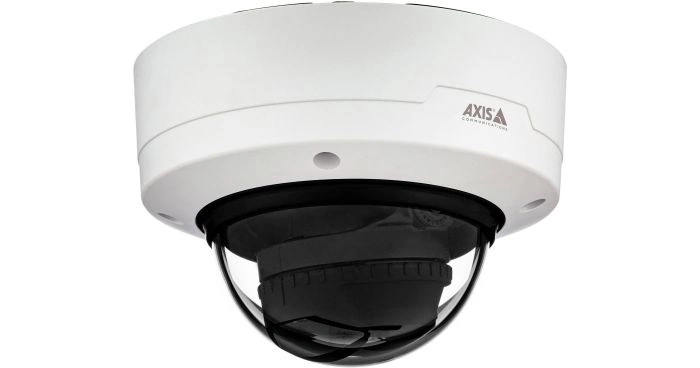
Network video cameras spanning compact, dome, bullet, PTZ, panoramic, thermal, multisensor and specialty applications.
Product and system guidance
Axis camera selection begins with pixels-on-target, lens and scene, not megapixels alone. Evaluate lighting/WDR/IR, motion, shutter, analytics, audio, environmental/vandal ratings, cybersecurity, bandwidth and mounting. Pair with AXIS Camera Station or a supported VMS/recorder and current AXIS OS management.
- Dome, bullet, box and compact camera families
- PTZ, panoramic, multisensor, thermal and radar-assisted coverage
- AXIS Object Analytics and edge applications
- Camera Station, edge storage, recorders and VMS integration
- Scene survey, pixels on target, lens and mounting
- Bandwidth, storage, retention and evidence export
- Firmware, cybersecurity, user roles and remote access
- Current regulatory, procurement and customer compliance requirements
Engineering before procurement
Boston High Tech validates current model availability, firmware, licenses, analytics, VMS compatibility and storage calculations. We do not publish private certificate numbers or named certificate-holder records; qualifications can be confirmed through appropriate private channels.
Request a video-system design review
Serving projects from our Charlotte headquarters and local client offices in Massachusetts, New York and New Jersey. Office visits are arranged in advance.
Official manufacturer references
How to compare and specify this product family
For Axis Network Cameras, Analytics and Recording, the right model and architecture depend on the site, existing infrastructure and operating policy. A proposal should clearly document the following video-surveillance system decisions before equipment is ordered:
- Scene purpose and required pixels on target
- Lens, mounting height, WDR, IR and low-light needs
- Analytics supported by the selected camera and VMS
- Bandwidth, PoE and network segmentation
- Retention, storage throughput and export workflow
- User roles, cybersecurity, health monitoring and support
Installation, testing and handoff
Design starts with the evidence or operational result required at each scene—not megapixels alone. We document fields of view, identification targets, lighting, camera placement, network load, recording profiles and retention assumptions. Commissioning covers focus, exposure, time synchronization, analytics calibration, user permissions, mobile or remote access, export testing and health alerts. Final documentation records device names, locations, addressing, retention settings and administrator procedures without publishing private credentials.
Frequently asked questions
How buyers choose Axis cameras by scene rather than megapixels, and what recording, analytics and network questions come first.
How many megapixels do we need?
Megapixels are the wrong starting number. Axis camera selection begins with pixels-on-target, lens and scene: what someone must be able to do with the recorded image sets the pixel density needed across the field of view. Lens choice, mounting height and distance to the subject then determine which camera delivers that density at the far edge of the scene.
When is a multisensor or PTZ better than several fixed cameras?
When one mounting position has to cover several directions or a wide open area. The range covers dome, bullet, box and compact families along with PTZ, panoramic, multisensor, thermal and radar-assisted coverage, and a multisensor puts several views on a single mount and drop. A PTZ trades that for reach on one view at a time, so pair a PTZ with fixed coverage.
How much storage and bandwidth will the system need?
The number comes from the camera list and the scenes, not from a per-camera rule. Bandwidth, storage, retention and evidence export are calculated together: resolution and frame rate per scene, how much motion each scene carries, the retention period the site has to hold, and what an export involves when someone requests footage. Document the calculation so later scene changes can be re-run against it.
Do the cameras need a separate network?
Not necessarily a separate network, but the cameras need a planned place on the existing one. Bandwidth, PoE and network segmentation are part of camera design: the PoE budget in each closet, uplink capacity from closet to recorder, and whether cameras sit on their own VLAN away from office traffic. Long cable runs get their drop location settled before any mount is chosen.
Do we have to run AXIS Camera Station, or can we keep our current recorder?
Either path is workable, and the deciding factor is what your recorder supports for the specific cameras and analytics you want. Axis cameras pair with AXIS Camera Station or a supported VMS or recorder, so check whether the existing system handles the streams, the analytics events and the user roles required. Analytics events a recorder cannot receive stop being useful after commissioning.
Once the cameras are in, who applies updates and who can view them remotely?
The owner assigns both roles, and the assignment belongs in the handoff document. Firmware, cybersecurity, user roles and remote access are treated as one decision set here: who applies AXIS OS updates and on what schedule, which staff may view, export or change settings, and how remote viewing reaches the system. An unassigned role is how a camera system drifts.
Official Axis software, firmware and support
Official manufacturer resources. We link out rather than host firmware.
Before updating: confirm model, hardware revision, current version, entitlement and rollback plan, and schedule monitored or life-safety-adjacent systems with the administrator.