
Single- and multi-door control hardware plus video-reader/intercom and partner integrations for Alta Access.
Products and selection guidance
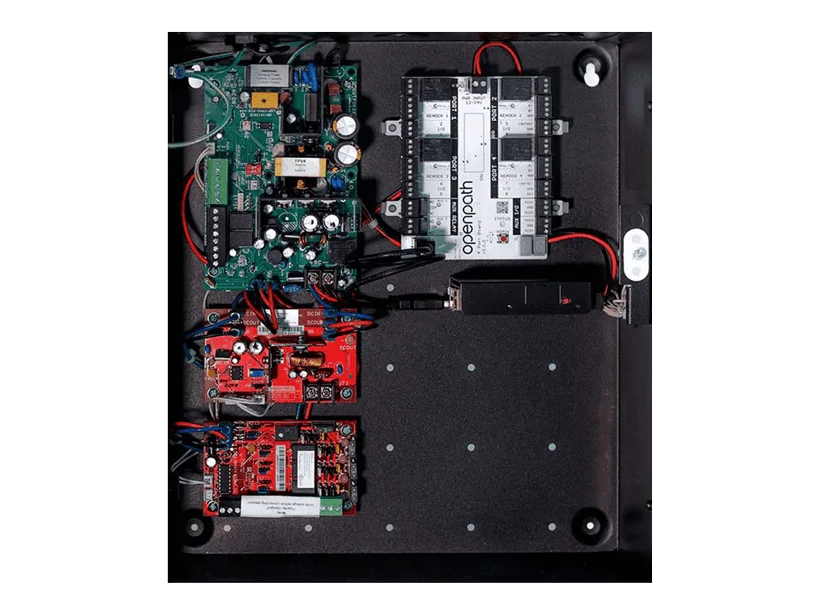
Alta controller and Smart Hub choices are sized by doors, readers, inputs/outputs and enclosure/power. Video Reader Pro and Video Intercom Reader Pro add camera/intercom workflows that require separate network, call-routing, privacy, recording and license decisions. Wireless lock and video integrations must be verified by current model and credential support.
- Single-door controller and Core Series Smart Hub choices
- Video Reader Pro and Video Intercom Reader Pro
- Alta Video and event-linked video workflows
- Allegion/ASSA ABLOY and third-party integration compatibility
- Door, lock, free-egress, accessibility and fire-alarm requirements
- Network, power, standby battery and outage behavior
- Current licenses, subscriptions, firmware and integrations
- Administrator training, backup, documentation and maintenance
Site-specific design
Boston High Tech inventories existing equipment and validates current manufacturer compatibility before specifying reuse, migration or replacement. Qualifications may be confirmed privately when needed; license numbers, certificate copies and named certificate-holder details are not published.
Request a manufacturer-specific consultation
Projects are supported from our Charlotte headquarters and local client offices serving Massachusetts, New York and New Jersey.
Official manufacturer references
How to compare and specify this product family
For Avigilon Alta Controllers, Video Intercom Reader and Integrations, the right model and architecture depend on the site, existing infrastructure and operating policy. A proposal should clearly document the following video-surveillance system decisions before equipment is ordered:
- Scene purpose and required pixels on target
- Lens, mounting height, WDR, IR and low-light needs
- Analytics supported by the selected camera and VMS
- Bandwidth, PoE and network segmentation
- Retention, storage throughput and export workflow
- User roles, cybersecurity, health monitoring and support
Installation, testing and handoff
Design starts with the evidence or operational result required at each scene—not megapixels alone. We document fields of view, identification targets, lighting, camera placement, network load, recording profiles and retention assumptions. Commissioning covers focus, exposure, time synchronization, analytics calibration, user permissions, mobile or remote access, export testing and health alerts. Final documentation records device names, locations, addressing, retention settings and administrator procedures without publishing private credentials.
Frequently asked questions
Questions about sizing Alta Access hardware, adding video at the door and confirming which existing locks and systems can join.
Several openings sit in one closet. Single-door controllers or a Core Series Smart Hub?
Count before choosing. Single-door controller and Core Series Smart Hub selections are sized by doors, readers, inputs and outputs, plus the enclosure and power that hardware needs in that closet. Include the openings you expect to add, and remember door position and request-to-exit devices consume inputs too, so the real count runs ahead of the door number.
What do the Video Reader Pro and Video Intercom Reader Pro add at an entrance?
They add camera and intercom workflows to the opening itself, which is a larger change than swapping a reader. Video Reader Pro and Video Intercom Reader Pro bring separate network, call-routing, privacy, recording and license decisions with them, and those are settled during design. Decide who answers a call, and where that video is retained, before the entrance is built.
Our doors are all different. Which details at the opening drive the hardware list?
Door, lock, free-egress, accessibility and fire-alarm requirements at each specific opening, because they set the lock type and the inputs the controller has to serve. Network, power, standby battery and outage behavior are recorded for that same opening. An opening on an egress path or a fire-rated wall can rule out a lock before any Alta hardware is picked.
Is wiring a video entrance different from wiring a card reader?
Yes, and the difference shows up before the wire does. A video entrance carries network, call-routing, privacy, recording and license decisions that a card-only door does not, and enclosure and power sizing follows in the same pass. The network path for that entrance is part of the entrance design, not an item left to the IT punch list.
The doors are not responding. How do we tell whether it is our network or the hosted service?
Start at the Avigilon Alta service status page, which reports the hosted side, then work down through the site: internet path, local network, controller power and the standby battery. Outage behavior for each opening should already be written into the design, so compare what staff are seeing against what the design said would happen.
Can we add wireless locks we already own to Alta Access?
That turns on the exact lock model and credential, not the brand on the lever. Allegion/ASSA ABLOY and third-party integration compatibility is verified by current model and credential support before any reuse is promised. Boston High Tech inventories the existing equipment and validates current manufacturer compatibility before specifying reuse, migration or replacement.
Avigilon Alta and Unity owner and buyer resources
Discuss Avigilon installation, maintenance or service
Detailed guides are maintained by 360TechnologyGroup.com, the parent-company knowledge center.
Official Avigilon Alta Access software, firmware and support
Official manufacturer resources. We link out rather than host firmware.
Before updating: confirm model, hardware revision, current version, entitlement and rollback plan, and schedule monitored or life-safety-adjacent systems with the administrator.