
Modular and purpose-built IP intercoms for residential, commercial, campus and high-abuse entrances.
What this product family does
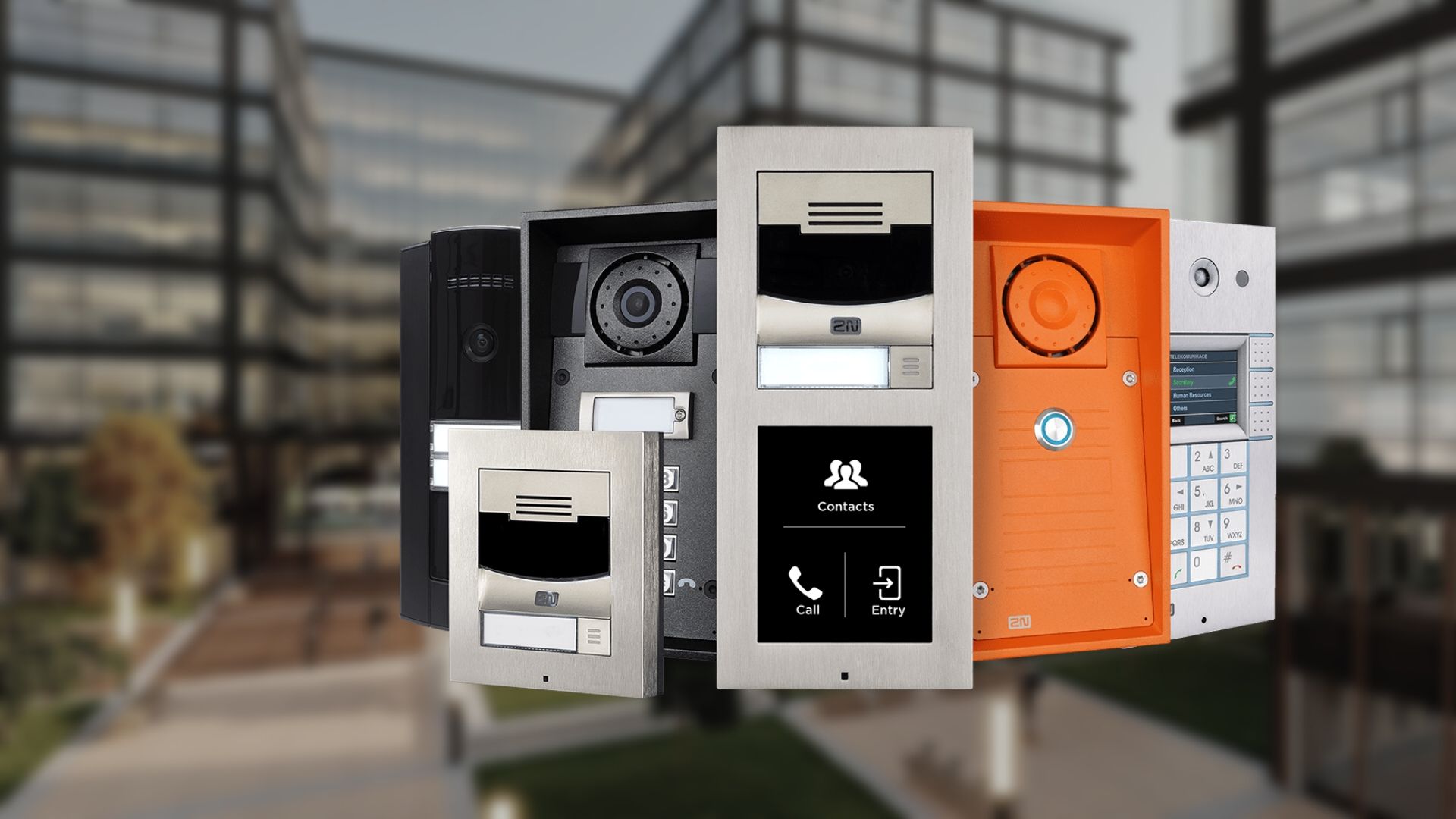
The current 2N portfolio includes product families such as IP Style, IP Verso/Verso 2.0, IP Force/Force 2.0, IP Solo, IP Base and IP One. They differ in display, camera, modularity, access methods, durability, mounting and target application; selection should begin with the entrance workflow rather than a model name.
Products and decisions
| Product area | What it includes | Selection guidance |
|---|---|---|
| Premium/display entrance | IP Style and applicable Verso configurations | Directory size, QR/PIN/mobile access, accessibility and display visibility |
| Modular entrance | IP Verso family | Choose camera, keypad, reader, display and I/O modules plus frame/backbox |
| High-abuse/outdoor | IP Force family | Confirm IP/IK ratings, camera, buttons, reader and installation environment |
| Compact entrance | IP Solo, Base or One family | Match call destinations, camera, access and mounting needs to published capacity |
Questions to answer before quoting
- Entrance type, visitors and call destinations
- SIP, VMS, access-control and directory integrations
- PoE/network, cybersecurity and remote management
- Weather, vandal, ADA and mounting constraints
- Who owns administration, backups, updates and recurring services?
- What must continue working during network, internet or power failure?
- Which opening, egress, accessibility and life-safety requirements apply?
- What training, documentation and preventive maintenance are required?
Request a product-specific site survey
Boston High Tech serves projects from our Charlotte headquarters and local client offices serving Massachusetts, New York and New Jersey.
Official manufacturer references
Capabilities and product families were checked against the manufacturer links below.
How to compare and specify this product family
For 2N IP Intercoms, the right model and architecture depend on the site, existing infrastructure and operating policy. A proposal should clearly document the following intercom and visitor-entry system decisions before equipment is ordered:
- Resident, tenant and directory workflow
- Audio/video quality at the proposed mounting point
- Mobile, desk-station and accessibility needs
- Door release, elevator and access-control interfaces
- Network, PoE, cellular and call-routing requirements
- Privacy, administrator roles and after-hours procedures
Installation, testing and handoff
Planning follows the visitor journey from arrival through verification, calling, release and audit history. We confirm mounting and accessibility, lighting and acoustics, door hardware, network paths, call routing, directory ownership and failover behavior. Commissioning tests every call destination and release path, including mobile and front-desk workflows, and verifies administrator roles and notification settings. The handoff includes directory-update procedures, user training and a documented support path.
Frequently asked questions
Choosing between 2N intercom families and planning the entrance, call routing and network work that goes with them.
IP Verso or IP Force for a parking-garage entrance?
IP Force is the family listed for high-abuse and outdoor entrances, where the environment, IP and IK ratings, camera, buttons and reader are confirmed for the installation point. IP Verso is the modular family, built up from camera, keypad, reader, display and I/O modules with a frame and backbox. A garage door exposed to weather and impact points toward Force.
We have a small back entrance with two call destinations. Do we need IP Style?
Not for that entrance. IP Solo, IP Base and IP One are the compact families, matched to call destinations, camera, access method and mounting against published capacity. IP Style and applicable Verso configurations belong at a premium or display entrance, where directory size, QR, PIN and mobile access, accessibility and display visibility drive the choice.
Does the backbox have to go in before the wall is finished?
Yes, treat it as rough-in work. For the IP Verso family the frame and backbox are chosen together with the camera, keypad, reader, display and I/O modules, so the module list has to be settled before the opening is cut. Weather, vandal, ADA and mounting constraints are recorded on the same walk, because they can move the mounting height.
Who updates the directory after a tenant moves in?
The directory owner named during design does, following the directory-update procedures included in the handoff package. Confirm that owner early: commissioning verifies administrator roles and notification settings with that person and tests every call destination and release path, including mobile and front-desk workflows, so a later name change is a directory task instead of a service visit.
Can calls ring our phone system instead of a dedicated station?
Call routing is designed around the destinations you name, and SIP, VMS, access-control and directory integrations are listed among the design items for the selected 2N family. Bring the phone platform, the extension plan and the directory owner into the design session, because supported destinations depend on that family and on the platform your side runs. The routing map is agreed before any station is ordered.
If the internet drops, can visitors still reach someone?
It depends which destination the call goes to. Mobile routing rides the internet path, while a front-desk station on the same local network does not, so list the call destinations and release paths that must survive an outage. PoE/network, cybersecurity and remote management decisions follow that list rather than the other way around.
2N owner, administrator and buyer resources
Discuss 2N installation, maintenance or service
Detailed guides are maintained by 360TechnologyGroup.com, the parent-company knowledge center.
Official 2N software, firmware and support
Official manufacturer resources. We link out rather than host firmware.
Before updating: confirm model, hardware revision, current version, entitlement and rollback plan, and schedule monitored or life-safety-adjacent systems with the administrator.